AI Spec Review for Electrical & Utility Contractors
How electrical and utility contractors bidding public works use AI spec review to read every spec book, catch buried requirements, and bid more in less time.
If you're an electrical or utility contractor bidding public works — substations, solar, plant work, PUD and municipal projects — AI spec review software reads the full bid set for you and surfaces what matters: bid due date and bond requirements, prevailing wage language, long-lead equipment buried in Division 26, non-standard specs that deviate from how you normally build, and Division 00/01 terms that change your risk. Instead of skimming a 600-page spec book the night before bid day, you upload the documents, get a one-page bid brief and a risk-ranked list of provisions in minutes, and spend your time pricing the work instead of hunting for landmines.
That's the short answer. The rest of this post covers what the manual process looks like, what actually hides in utility spec books, and what a per-bid workflow with a tool like DeadFront.AI looks like in practice.
Table of Contents
- Why Is Bidding Utility Work So Hard on Estimating Time?
- What Should You Check in Every Public-Works Spec Book?
- Where Do the Expensive Misses Hide?
- What Does AI Spec Review Actually Do?
- What Does the Per-Bid Workflow Look Like With DeadFront?
- What Does the Output Look Like on Real Utility Bids?
- FAQs
- Bottom Line
Why Is Bidding Utility Work So Hard on Estimating Time?
Public and utility work has a rhythm most commercial contractors don't deal with: volume. If you're chasing PUD, municipal, co-op, and agency projects, a bid a week isn't unusual. Some weeks it's two.
Every one of those bids comes with its own spec book. Not a variation on the last one — a genuinely different document set, because:
- Every agency writes its own front end. One PUD wants a 5% bid bond and a pre-bid meeting that's mandatory; the city next door wants 10% and the pre-bid is optional. One references state prevailing wage rates; another layers federal Davis-Bacon on top because there's grant money in the project.
- The technical sections get reused and modified. Agencies pull spec sections from past projects and their engineers edit them. That means a Division 26 section that looks familiar can carry one paragraph that isn't — and that paragraph is the one that costs you.
- Half the documents are scans. Smaller agencies and rural utilities still issue scanned bid sets — photocopied front ends, faxed addenda, image-only PDFs. You can't Ctrl+F a scan.
Do the math on manual review. A serious read of a 400–800 page bid set takes hours, and that's before addenda land. At a bid a week, you either burn your best estimator's time reading boilerplate, or you skim — and skimming public-works specs is how contractors end up eating bond penalties, wage-rate mistakes, and equipment lead times nobody priced.
What Should You Check in Every Public-Works Spec Book?
Whether you review manually or with software, the checklist for an electrical/utility bid set is fairly stable. Here's what should get checked on every single bid:
| Category | What to Find | Where It Usually Lives |
|---|---|---|
| Bid logistics | Due date/time, delivery method (physical vs. electronic), required forms | Division 00 — Invitation to Bid, Instructions to Bidders |
| Bonds | Bid bond % (5%? 10%?), payment and performance bond requirements | Division 00 |
| Pre-bid meeting | Mandatory or optional, date, site-visit requirements | Division 00 |
| Wages | State prevailing wage vs. Davis-Bacon (or both), certified payroll requirements, apprenticeship utilization | Division 00/01 |
| Owner-furnished material | What the utility supplies (often transformers, meters, wire) vs. what you furnish | Division 01 and Division 26 |
| Long-lead equipment | Transformers, switchgear, MCCs, relays, custom panels — and who carries schedule risk | Division 26, sometimes Division 01 milestones |
| Submittals | What's required, review timelines, resubmittal rules | Division 01 33 00 plus each spec section |
| Non-standard requirements | Anything that deviates from how you normally build: labeling, testing, spare parts, training hours, warranty terms | Buried anywhere in Divisions 26/27/28 |
| Liquidated damages & milestones | Daily LD amounts, interim milestones, outage windows | Division 00/01 |
| Retainage & payment | Retainage %, payment cycle, escrow options | Division 00 |
If you're not familiar with how spec books are organized by division and section, our CSI MasterFormat guide is a useful reference — Division 26 (Electrical), 27 (Communications), and 28 (Electronic Safety and Security) are home turf for electrical contractors, but Division 00 and 01 are where public agencies put the terms that change your price.
The problem isn't knowing what to look for. Every experienced estimator knows this list. The problem is doing it thoroughly, every week, on a new document set, under deadline.
Where Do the Expensive Misses Hide?
Three places, in our experience.
Long-lead equipment buried in the technical sections
Transformer and switchgear lead times have been brutal for years. The spec question isn't just "what's the gear" — it's who carries the schedule risk. A Division 26 section that requires a specific manufacturer, a non-standard rating, or seismic certification can quietly turn a 30-week lead item into a 60-week one. If the front end has liquidated damages and interim milestones, and the spec doesn't allow substitutions, you're pricing schedule exposure whether you noticed it or not. That connection — Division 26 equipment requirement plus Division 00 LD clause — is exactly the kind of cross-document interaction that gets missed when different people skim different volumes.
Non-standard requirements that look like boilerplate
One real example (anonymized): a contractor missed a spec requiring conduit labeling every 30 feet — the standard practice is labeling at start and termination only. Across more than a million feet of conduit in a data center, that one sentence turned into a $600k+ loss and weeks of delay. Nobody skips the "conduit identification" paragraph on purpose. It just reads like every other conduit identification paragraph — until it doesn't.
A large spec book usually contains requirements that deviate from standard practice, and a few of them are serious enough to warrant an RFI or clarification before bid.
Owner-furnished vs. contractor-furnished confusion
Utility work is full of owner-furnished material — the utility buys the transformer, you install it. But the split varies by agency and by project, and the language lives partly in Division 01 and partly in the technical sections. Assume the wrong side of that split on major gear and your number is wrong by six figures in either direction: too high and you lose the bid, too low and you win a loser.
What Does AI Spec Review Actually Do?
Honestly stated: AI spec review reads every page of the bid set and extracts requirements into a structured, reviewable list, so a human can review in minutes what used to take hours. It does not price the work, and it doesn't replace estimator judgment about what a requirement means for your crews and your means and methods.
What good AI spec review does concretely:
- Extracts every provision, deadline, and requirement from the full document set — front end, general conditions, and technical sections — and risk-scores them, so deviations from standard practice float to the top instead of hiding on page 412.
- Cites its sources. Every extracted item links back to the exact passage in the PDF, so you verify in one click rather than taking the software's word for it.
- Handles scanned documents. Modern tools OCR image-only agency PDFs automatically, which matters a lot for rural utility and municipal work.
- Compares addenda against the original documents so you see exactly what changed instead of re-reading the whole section.
If you're evaluating this category against contract-review tools, we wrote a straightforward comparison in DeadFront.AI vs. Document Crunch — the short version is that spec-focused and contract-focused tools solve different parts of the problem.
What Does the Per-Bid Workflow Look Like With DeadFront?
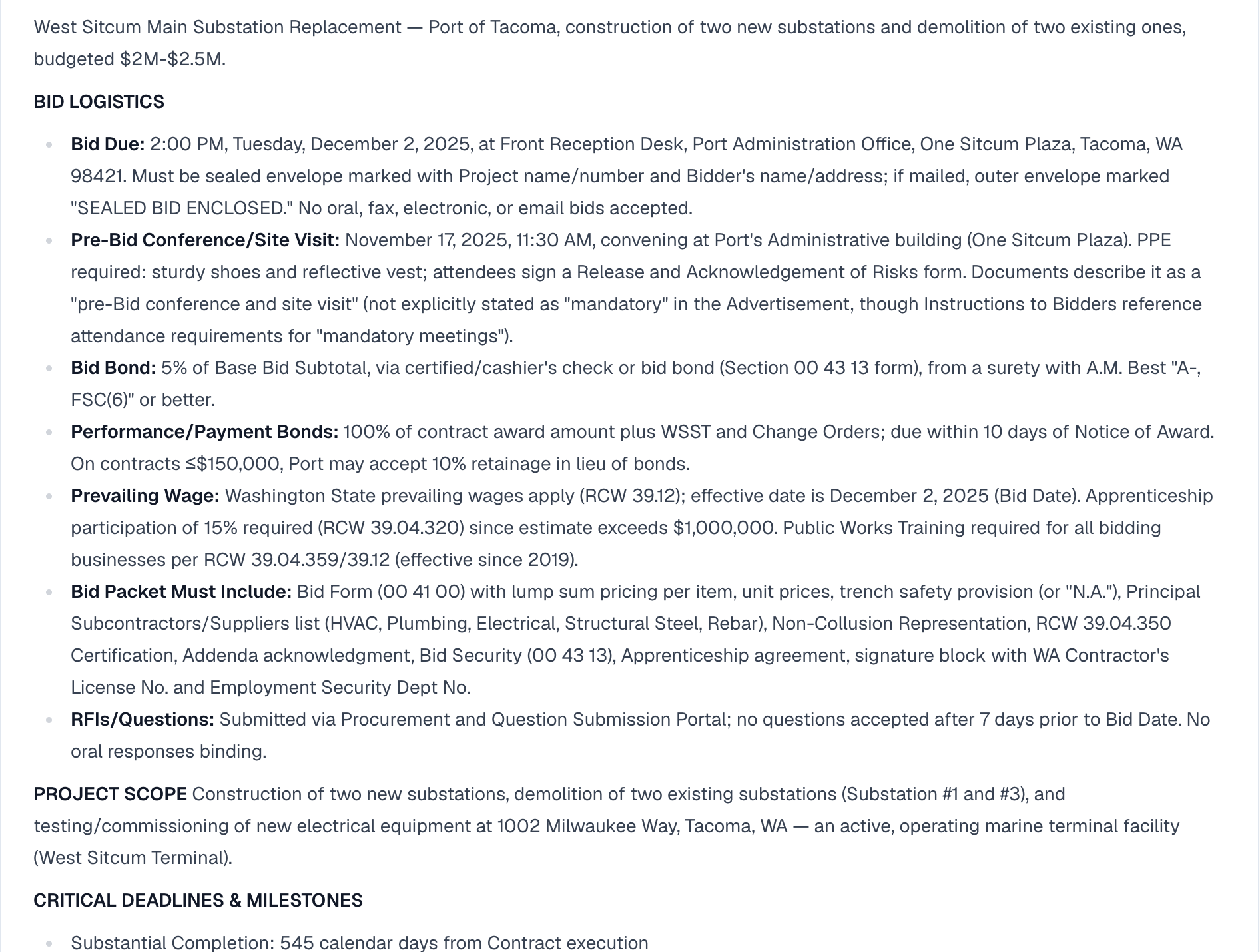
Here's the per-bid loop. One project per bid.
1. Create a project and upload the bid set. Drag in everything the agency issued — invitation to bid, general conditions, technical specs, addenda. Multiple PDFs, hundreds to 1,000+ pages, is normal. Scanned documents are processed automatically via OCR (they get a badge noting that in-PDF highlighting isn't available for scans, but the extracted content is all there).
2. Read the Bid Brief. While processing runs, DeadFront builds a one-page brief per project: bid due date and time, submission location and format, mandatory pre-bid meetings, bid bond percentage and payment/performance bond requirements, prevailing wage and union requirements, owner-furnished vs. contractor-furnished material, top risk items, and key contacts (who gets your RFIs, who the PM is). For a go/no-go decision, this is often all you need — and it's the difference between "we'll look at it this weekend" and a same-day answer.
3. Work the high-risk list. The default view shows the highest-risk extracted items first, each with a rationale and a citation that highlights the exact source text in the PDF. This is where the every-30-feet-labeling class of requirement surfaces. An estimator scans the list, clicks through the citations that matter, and flags the items that need an RFI. One-click actions draft the RFI or a vendor email directly from the flagged item.
4. Pull the submittal log. DeadFront auto-builds a submittal log from the specs with CSI section, submittal type, and long-lead flags, exportable to Excel in one click. Pre-bid, the long-lead flags are the point: it's a fast way to see every piece of gear that needs a quote and a lead-time check before your number goes in.
5. Ask questions in document chat. "What are the liquidated damages?" "Is the transformer owner-furnished?" "What testing is required for the switchgear?" Answers cite and highlight the exact passage, across all uploaded documents at once — which is how you catch a Division 01 answer to a Division 26 question.
6. Diff the addenda. When Addendum 2 lands three days before bid, Spec Diff compares versions and shows exactly what was added, removed, or modified — so you price the revision instead of re-reading the section and hoping you spot the change.
Then the next bid comes in, and you do it again. The workflow is deliberately boring. That's the point.
What Does the Output Look Like on Real Utility Bids?
We publish DeadFront's analyses of real public utility bids, built only from the documents the agencies posted: Benton PUD Padmount Switchgear PME-11 & 12 and Cowlitz PUD South Kelso Substation Fence Hardening. Both bids have closed; the pages are kept as samples of the brief, the risk-scored provisions, and the submittal count.
For a shop bidding utility work every week, nobody does a deep manual read of every spec book — there aren't enough hours. The realistic comparison isn't "AI review vs. careful manual review." It's "AI review plus targeted human verification vs. skimming and institutional memory." The tool doesn't have to be smarter than your best estimator. It has to be more thorough than a skim, every week, without getting tired.
FAQs
Does AI spec review work on scanned agency bid documents?
Yes. DeadFront processes scanned and image-only PDFs automatically using AI vision OCR — common with smaller municipalities, PUDs, and co-ops. Extraction, risk scoring, and chat all work on scanned documents; the one limitation is that click-to-highlight in the source PDF isn't available for scans (those items carry a badge noting it).
Will it catch prevailing wage and bond requirements that vary by agency?
That's a core function. Bid bond percentage, payment/performance bond requirements, and prevailing wage/union language are extracted into the Bid Brief on every project, so agency-to-agency variation gets read fresh from each document set rather than assumed from the last bid.
Can it flag long-lead electrical equipment like transformers and switchgear?
Yes. The auto-built submittal log includes long-lead flags alongside CSI section and submittal type, and equipment requirements with schedule implications show up in the risk-scored extraction. You still make the lead-time calls with your vendors — the tool makes sure nothing needing a quote is sitting unnoticed on page 500.
How long does it take per bid?
Processing runs in the background after upload. The review itself — brief, high-risk list, flagging RFI items — takes minutes for contractors running this weekly, versus hours for a manual read of the same documents.
Do I still need an estimator to read the specs?
Yes — for the items that matter. The honest framing: AI review changes what your estimator reads. Instead of 800 pages, they review a risk-ranked list and click through citations on the 20–40 items that deviate from standard, applying judgment where judgment is actually needed.
What does it cost, and is there a way to try it before committing?
The Pro plan is $1,000/month with unlimited users and up to 25 active projects — sized for exactly the high-volume bid workflow described here — and starts with a 30-day pilot. Details at /pricing. There's also a sample demo you can walk through with no signup.
Bottom Line
If you're bidding a public-works project a week, the constraint isn't estimating skill — it's reading time. Every agency spec book is different, the expensive requirements hide in familiar-looking paragraphs, and scanned documents make even keyword searching impossible. AI spec review doesn't replace your estimator; it makes a full read of every bid set possible at a volume where it wasn't before, and it gives you a citation trail to verify everything it flags.
The fastest way to evaluate it is with your own documents: run a real bid set from a recent project and compare what surfaces against what your team caught.
- Book a 15-minute demo and bring a spec book from an active pursuit
- See the sample demo — no signup required
- See pricing for the Pro plan and 30-day pilot details
Get the weekly Northwest bid digest
New public-works electrical and utility bids across WA, ID, OR, and MT — each with an AI mini-brief of due dates, bonds, and gotchas. Free, every Monday, unsubscribe anytime.
Ready to catch million-dollar mistakes?
See how DeadFront.AI automates specification review and prevents costly errors.
Related Articles
Scanned Bid Documents: OCR for Construction Specs
Can't search a scanned bid set? How to tell if a PDF is image-only, free OCR options for construction specifications, and where DIY OCR falls short.
Can You Use ChatGPT to Review Construction Specs?
Yes, for quick questions. But ChatGPT hits real walls on 1,000-page bid sets: context limits, no verifiable citations, scanned PDFs. Here's an honest breakdown.
The Complete Guide to AI Construction Software (2026)
Discover how AI-powered construction software is transforming preconstruction workflows, specification management, and project planning. Compare the top 8 tools for 2026.